Steps for Bing Webmaster Tool

What is Bing?


bing webmaster

Bing is a free service tool, operated by the Microsoft. It was developed on May 28, 2009. This provides lots of variety services, like image, video and map search product.

Bing Webmaster Tool

Bing webmaster tool is free service by Microsoft. This allows webmaster to add their website to index crawler. The webmaster tools support webmaster to access data and mange their website on Bing.

1.Go Bing webmaster site, then open the account.

You can open Bing webmaster tool account by using google or Microsoft account. If you already have Microsoft account, then sign in.

2.Add and verify your web site

After sign in the account, go to Bing webmaster home page. Next step is to  adding your site URL into Bing account . Then adding, site map address (website URL/sitemap.xml). Then click add button. After that, we have to do Meta tag authentication. In this step you can copy and paste a<Meta > tag in your default webpage.

Fetch As Bingbot

This tool is, find out from Diagnostics and tool section. It helps to see how the bingbot sees when the page downloading from your site. In this section, enter your website URL and click fetch. Then these tools send a request to bingbot for processing. After processing, it show indexing request. When the indexing process completed, then the status will change to complete.
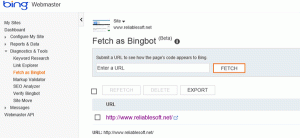
 

bingbot

Features

The Bing webmaster tool support webmaster to access data and manage their website on Bing.

  • Crawl issues: It allows webmaster to discover, any issues found with their website such as unsupported content ,file not found error, long dynamic URLs and blocked by REP
  • Back link data: It allows webmaster to access data about their referring links
  • Data download: It allows webmaster to access the first 1000 result in a CSV file to analyse the result
  • Keyword search tool: It allows webmaster to search new keywords
  • Sitemaps: It allow webmaster to check If the site map is properly viewed on Bing
  • Outbound links: It allows webmaster to see the outbound links Bing sees.

Revathy

For more details

SEO history and evolution

On-page optimization

Webmaster tools

Google analytics


Google analytics Vs Goggle webmaster

 Google Analytics Vs Google Webmaster Tools

Google analytics and Google webmaster tools are offered by Google. These two are particularly important for digital marketing.

Google analytics


google analytics

Google analytics is a free service tool offered by Google. It helps to find out website traffic. Now a day’s Google analytics is widely used for track and reports website traffic. By using Google analytics, we can find out

-The number of visitor in your website

-more popular web page

-the most interested web page by the visitor

bounce rate and exit rate

Google analytics can tell how many people are finding your site and how they are engaging with it. Google introduced this service on the year 2005. Now Google analytics is the most widely used web analytic service on the internet. It is the best Google tool for websites to improve the quality. Which is also integrates with variety of product including Adsence , Google+ and Ad words.

Google Webmaster tools


webmaster tool

The Google webmaster tool is also called Google console. It is free Service offered by Google. Which helps to webmaster for finding index status and optimization result . It can easily communicate with Google and websites and detect if there is any problem in webpage. So it is an important Google tool.  This helps to improve your site’s visibility in search. You can see how many impressions your site generating in search engine result. By using webmaster tool, we can find out

-error occurs in the website

-crawl error

-receive notification from Google

-when the Google bot’s access particular site, webmaster can find out craw rate

-check security issues

The main difference between Google analytics and webmaster tool are. In google analytic reports on how users interact with your site. In webmaster tool reports on how search engines interact with your site. By using Google analytics and webmaster tools provides valuable and actionable information. The best part is, they’re both free.

Revathy

For more details

SEO history and evolution

On-page optimization

Webmaster tools

Google analytics

How to create a free blog

How to create a free blog

Blogger

blogger

Blogger is a free service that allows multiple-user blogs can be published on the blogger site. The blogs are hosted by Google. It’s very easy to understand and manipulate them. A user can published up to 100 blogs per account. Most people are widely used this method for creating the blogs. Most of  the new blogging professionals have doubt  about blogging service. After reading this article ,easily sort out all doubts about blogger. For creating a blogger account , you must have a Google account also. We can open the blogger account by using gmail. Which is the free website to publish the blogs and anyone can publish their blog on blogger.com .

Steps to create a blog:

1.Go to the blogger site , sign into blogger by using gmail.

2.On the left side , click the down arrow

3.Click a new blog

4.Type a name for your blog

5.Select blog address or URL

6.Select Template

7.Click create blog

The blogger offer equal ability and features to all customers, It does not depends on how many visitors in your blog. The blogger supports ad sense programme.

Importance things to be remember when we write a blog

  • Using highly effective Keywords, but don’t do keyword stuffing
  • Contents are simple and meaning full and avoid content duplication
  • Put comma and space properly, after comma and full stop put space
  • H1,H2 tags are important, keep the alignment properly
  • Title tag does not exceed 44-50 characters
  • Don’t forget anchor text
  • Use the URL to help for visitors
  • When the image adding on the blog, must to put alt text
  • In authorization process , write rel=”author” in html code
  • Share your post to social media , it helps to ranking your blog

Word press

word press

It is the most popular content management system based on PHP and MySQL. Word press was released on may 27,2003. Which is the most powerful blogging and content management system in existence today. Word press is free and we can write  up to 100 blogs per account. Compared with blogger account , it sub domain is more powerful.  Now a days, many famous blogs, news outlets and celebrities are using Word press.

Steps To Create Word press account:

1.Go to the home page, click get start button

2.Fill the name and details and click continue button

3.open a new page for selecting domain name, choose a domain name for your site.

4.select free plan, then enter email address , user name and password

5.If you agree the term condition then click and continue

6.confirm the email from the word press

Difference between blogger and word press

Domain name
  • In blogger ,we use pre-registered domain name
  • In word press, we use our own domain name
Storage space
  • In blogger , for more storage our account will be connected to google+ account
  • In word press, Includes domain and unlimited space

 Design

  • In blogger site have limited number of designs
  • In word press have lots of design


Revathy

For more details

SEO history and evolution

On-page optimization

Webmaster tools

Google analytics


Feed Burner

Feed Burner

feed burner logo

Feed burner tool is used for web feed management. It helps to manage bloggers, pod caster and other web-based content.

 Which provide subscribe option.  Feed burner was founded by Dick Costolo and launched in 2004. The dick costolo was CEO of twitter  from 2010 to 2015.

It can be used on any website to set up RSS feeds. It helps to publishers for traffic analysis and an optional  Adversyising  system.

 By using feed burner, the publisher can find out how many people have subscribed to their feeds. When more users subscribe our web site , it helps to increase the credibility. The verification process only done through  gmail account.

Steps for Feed burner

-First visit feed burner home page to begin the process. In this step , you will type the link to your blog feed.

-In this step we will choose the title and address of your feed. Then ,your feed is created.

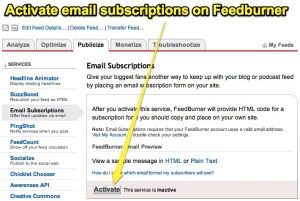
-In next page , you can choose the publicize option and  take email subscription, by activation we will get a code. The code is paste on the dashboard of the blogger.

                                                                  emailsubscription

-In dashboard take the option lay out, then click add gadget and copy the HTML code. Copy the code in to content and click save the arrangement

-Then we get the subscription box on the published blog post.

Advantages of Feed burner

-The Feed burner doesn’t have a strong effect for SEO. But it helps to boosting your blog traffic.

-When the number of subscribers increases in your  blog  , then your blog feed become more popular .

-By using feed burner , multiple blog feed can burn with one account

-personalise and optimize your feed

-User can easily subscribe your feeds

-The user get latest updates directly get by their email

-It helps to exposes your Feed, so all your feed get easily crawled and indexed in search result.

Features of feed burner

Subscription management

  • we can activate and deactivate individual email adress
  • when the user unsubscribe , get an optional email
  • we can view and sort the list

Communication preferences

  • The subject line and body text can be customized so that the email that is send to subscriber.
  • the email are text only and the conformation link must be included in your confirmation mail .

Delivery options

  • select two-hour delivery window ,then which send daily your diget
  • select your time zone

                                                                                                                                                            Revathy