
What is Bing?

Bing is a free service tool, operated by the Microsoft. It was developed on May 28, 2009. This provides lots of variety services, like image, video and map search product.
Bing Webmaster Tool
Bing webmaster tool is free service by Microsoft. This allows webmaster to add their website to index crawler. The webmaster tools support webmaster to access data and mange their website on Bing.
1.Go Bing webmaster site, then open the account.
You can open Bing webmaster tool account by using google or Microsoft account. If you already have Microsoft account, then sign in.
2.Add and verify your web site
After sign in the account, go to Bing webmaster home page. Next step is to adding your site URL into Bing account . Then adding, site map address (website URL/sitemap.xml). Then click add button. After that, we have to do Meta tag authentication. In this step you can copy and paste a<Meta > tag in your default webpage.
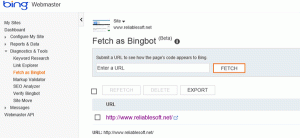
Fetch As Bingbot
This tool is, find out from Diagnostics and tool section. It helps to see how the bingbot sees when the page downloading from your site. In this section, enter your website URL and click fetch. Then these tools send a request to bingbot for processing. After processing, it show indexing request. When the indexing process completed, then the status will change to complete.
Features
The Bing webmaster tool support webmaster to access data and manage their website on Bing.
- Crawl issues: It allows webmaster to discover, any issues found with their website such as unsupported content ,file not found error, long dynamic URLs and blocked by REP
- Back link data: It allows webmaster to access data about their referring links
- Data download: It allows webmaster to access the first 1000 result in a CSV file to analyse the result
- Keyword search tool: It allows webmaster to search new keywords
- Sitemaps: It allow webmaster to check If the site map is properly viewed on Bing
- Outbound links: It allows webmaster to see the outbound links Bing sees.
For more details
 Revathy SEO Analyst