
Feed Burner

Feed burner tool is used for web feed management. It helps to manage bloggers, pod caster and other web-based content.
Which provide subscribe option. Feed burner was founded by Dick Costolo and launched in 2004. The dick costolo was CEO of twitter from 2010 to 2015.
It can be used on any website to set up RSS feeds. It helps to publishers for traffic analysis and an optional Adversyising system.
By using feed burner, the publisher can find out how many people have subscribed to their feeds. When more users subscribe our web site , it helps to increase the credibility. The verification process only done through gmail account.
Steps for Feed burner
-First visit feed burner home page to begin the process. In this step , you will type the link to your blog feed.
-In this step we will choose the title and address of your feed. Then ,your feed is created.
-In next page , you can choose the publicize option and take email subscription, by activation we will get a code. The code is paste on the dashboard of the blogger.
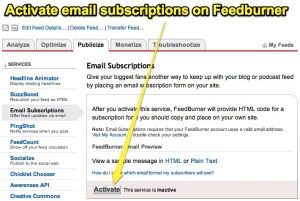
-In dashboard take the option lay out, then click add gadget and copy the HTML code. Copy the code in to content and click save the arrangement
-Then we get the subscription box on the published blog post.
Advantages of Feed burner
-The Feed burner doesn’t have a strong effect for SEO. But it helps to boosting your blog traffic.
-When the number of subscribers increases in your blog , then your blog feed become more popular .
-By using feed burner , multiple blog feed can burn with one account
-personalise and optimize your feed
-User can easily subscribe your feeds
-The user get latest updates directly get by their email
-It helps to exposes your Feed, so all your feed get easily crawled and indexed in search result.
Features of feed burner
Subscription management
- we can activate and deactivate individual email adress
- when the user unsubscribe , get an optional email
- we can view and sort the list
Communication preferences
- The subject line and body text can be customized so that the email that is send to subscriber.
- the email are text only and the conformation link must be included in your confirmation mail .
Delivery options
- select two-hour delivery window ,then which send daily your diget
- select your time zone
 Revathy SEO Analyst